
Read the first chapter of Body Talk by Dane DeSutter and Stephanie Scopelitis
In Body Talk: Using Gestures to Rethink Human-Centered Products by Dane DeSutter and Stephanie Scopelitis, explore the role of the body in enriching foundational research, supporting collaborative ideation, advancing and validating designs, and facilitating technical conversations to ground nascent technology in complex human experiences.
Read chapter one for free below!
Chapter 1: The Need to Go Deeper
It started with a hand. Sam Farber, creator of OXO Good Grips, watched his wife Betsey struggle with a vegetable peeler. Arthritis had turned a simple kitchen tool into daily frustration.
“This is hard to hold,” she said. As she set the peeler down, she instinctively grasped her wrist, flexing her fingers to stretch out the ache. A team relying solely on the words “hard to hold” could have started crafting a product solution that missed the mark entirely. Maybe they would have proposed changing the grip material or adding some additional texture to the handle. However, these well-intentioned solutions would have overlooked what Betsey really needed.
But Sam looked beyond the words. He saw his wife’s flexed fingers and noticed her massaging her wrist. He then observed the tense, full-fisted grip she had been forced to use. This key observation of the body revealed the real problem: the shape of the handle was forcing her hand into an unnatural posture. That insight, found through observing the body, is in no small part why the iconic, wider Good Grips handle exists today.
This principle that the body reveals needs that words may not reveal is universal. It applies whether you are designing a physical tool like a vegetable peeler or a digital interface. At the end of the day, all human-centered design needs to be grounded in and informed by the body, because every experience is lived through physical actions and reactions.
You Need to Go Deeper
Working in product, design, or UX, you entered this field to create products that genuinely help people, whether to delight them, solve everyday frustrations, or make their lives easier. Fulfilling that mission requires driving at a deeper understanding of what people need.
To achieve this, you may talk to top customers, observe people on the job, or look at analytics to see where people spend their time. You might also read forums, run focus groups, or conduct in-depth interviews. Maybe you’re starting to even leverage AI to parse social media posts and customer support tickets at scale.
You already use this information and apply tools to make sense of it to build a clear path for product development. Product teams rely on an arsenal of tools to understand people, communicate clearly, and collaborate effectively. You’ve probably used many of them: journey maps, personas, wireframes, and even the classic “How Might We” exercise. These tools help teams structure ideas, surface assumptions, and keep miscommunication in check in order to guide roadmap decisions with intention.
But a bias runs through nearly all of these tools: it’s the primacy of language. Written or spoken, words pave the pathway for the product development journey. They carry insights from research, fuel ideation, and frame design choices.
Words are crucial and informative. Yet even with all these well-intentioned tools and processes, products sometimes still miss the mark. The reality is that it’s not always about failing to listen closely to the words; it can also be about failing to listen to the body.
To build human-centered products, you need to understand humans fully, not just through what they say, but also through what they do. The way that people move their hands and bodies, shift their posture, adjust their gaze, and react through facial expressions is part of how they think, communicate, and coordinate their actions. To build products that truly fit people’s needs, you have to look beyond language to the way the body talks. And that applies to everyone in your work: the people you build for, and the people you build with.
NOTE: GESTURES DEFINED
Gestures are part of the spontaneous and intentional physical actions that people make. They include hand movements, body posturing, and shifts in gaze. More than just emotional expressions, gestures are active participants in the thinking, communication, and coordination that drive product development.
Go Beyond Words
To supercharge how you create products for people, you need to supercharge how you understand people holistically. Going beyond language and making use of what the body “says” can help you. 4 Chapter 1
HOW MUCH IS “SAID” NONVERBALLY?
You’re probably familiar with the claim that 80% of human communication is nonverbal. While widely cited, this figure is likely an overgeneralization that stems from psychologist Albert Mehrabian’s “7-38-55 rule.”1 Mehrabian’s research focused on how people interpret feelings and attitudes when verbal and nonverbal cues are incongruent. He found that in cases where words and body language didn’t match, people relied on verbal content only 7% of the time, while tone of voice accounted for 38% and facial expression for 55%. This led to the common estimate that 80-90% of communication is nonverbal, although this interpretation overlooks the specific conditions of his study.
The idea gained traction, particularly in public speaking seminars and communication training. Mehrabian himself later clarified2 that his findings do not mean that words are insignificant; rather, nonverbal cues play a significant role in resolving ambiguity about emotional intent. The research numbers may vary depending on how gestures are utilized. For example, Adam Kendon suggests that gestures account for as much as 50% of the meaning conveyed in conversations.3 What remains true is that gestures are not an adjunct to talk; they are an essential part of it.
1 The so-called “7-38-55 rule” traces back to two experimental studies by Albert Mehrabian and colleagues (1967). These studies looked specifically at how people judge emotional attitudes when verbal and nonverbal cues conflict, producing the well-known weighting of verbal content, vocal tone, and facial expression. The popular summary was later condensed into the 7/38/55 proportions.
2 Mehrabian later emphasized in Silent Messages and subsequent interviews that these findings apply only when interpreting feelings under ambiguous conditions. He cautioned against using the percentages to describe communication more broadly.
3 Adam Kendon’s work (e.g., Gesture: Visible Action as Utterance, 2004) provides a more nuanced view, showing that gestures can contribute substantial semantic content in conversation, particularly when speakers describe spatial layouts, actions, or abstract ideas.
Consider the universal usability test. A user is shown a prototype and clicks through. A researcher or designer asks for feedback on the prototype, and the user says that it was “easy to use.” (That’s what the transcript captured as well!) However, they also noticed a hesitation in the user’s voice that was coupled with a furrowed brow and hesitant mouse movements. Though never articulated in language, the unspoken aspects of this session hinted at a more nuanced interpretation of this user’s experience. The design concept is likely not, as the words state, entirely “easy to use.” There’s more work to do!
Although words are essential in how people share thoughts, communicate ideas, and work together, the words people share don’t always tell the entire story. Relying solely on words might risk overlooking crucial information that is embedded within nonverbal cues. Hand gestures, facial expressions, gaze, and body posture often significantly enhance talk, adding critical meaning and essential understanding when words alone fall short.
The Case for Gestures
Gestures are not just hand waving. They aren’t mere decorations, nervous fidgets, partial fill-ins for words, or simply learned cultural habits. They are something more.
Gestures do more than add kinetic flair. Just as a knife cuts and a wrench tightens, gestures do something. When you are planning out the argument in an essay, and you stack imaginary ideas in the air, you are using your hands to organize your thinking before you write a single word.
When you are planning what to say in a meeting, you might move your hands in front of you as if laying out points in space—placing one idea here, another there, and then circling back to the first. Your hands help you organize the sequence of your thoughts before you say a word. When you raise your arm and lean forward on the sidewalk to hail a cab, your action stops a two-ton vehicle. When you use your finger to stand in for a wood peg and then motion how it joins the back and side of an IKEA bookshelf, you’re explaining how to complete a step in the instructions (and hopefully not fighting with your significant other).
Gestures provide a visceral channel of insight and action and serve as a silent invitation for exchange that propels everyone forward.
GESTURE-LANGUAGE LINK: EVIDENCE FROM APHASIA
The connection between language and movement is deeply rooted in human biology. Research in embodied cognition shows that understanding action-related language engages parts of the motor system, overlapping with the neural circuits used for action execution.4 One striking piece of evidence that established the gesture-language link comes from patients who have suffered strokes. Aphasia, a disorder caused by localized brain damage, can result in selective linguistic deficits depending on the location of the damage. Clinical researchers working with these patients have also extensively documented correlated impacts on gesture production.5 This distinction is particularly clear when comparing Wernicke’s and Broca’s aphasia (see Figure 1.1).
Wernicke’s aphasia (also known as fluent aphasia) occurs when people experience damage to the brain’s language comprehension center. Patients with fluent aphasia are able to produce fluent speech, but often what they say is not coherent. Interestingly, researchers observed that these patients produce gestures that also lack conceptual depth. Rather than producing illustrative or meaningful gestures, they primarily rely on pointing, suggesting a disruption in their ability to encode cohesive ideas into both speech and movement.
Broca’s aphasia (also known as nonfluent aphasia), by contrast, occurs when people experience damage to the brain’s speech production center. While these patients struggle to control the muscles that move the tongue and vocal cords to produce vocalizations, their ability to comprehend language remains intact. Though difficult, these patients can produce speech that is coherent and logically organized. Notably, their gestures remain unaffected, often serving as a compensatory tool to express meaning when words fail.

FIGURE 1.1 Patient with Wernicke’s aphasia uses simple pointing gestures that provide little additional meaning to the language (left); patient with Broca’s aphasia struggles to verbalize the number “60” and uses gestures to compensate for missing language (right).
When language comprehension and production are selectively disrupted by damage to the brain, parallel deficits emerge in gesture. The contrast between these two types of aphasia reinforces that gestures and language originate from the same neural system6 and share a deep network for representing meaning across both modes.
4 Gallese and Lakoff (2005) synthesized evidence from neuroscience and cognitive linguistics to argue that conceptual understanding—including abstract concepts— is embodied, relying on distributed sensory, motor, and affective systems rather than abstract symbols.
5 McNeill (1985) reviewed evidence from Broca’s and Wernicke’s aphasia showing that gesture and speech exhibit parallel patterns of impairment and preservation following brain injury. Broca-type patients retain referential words and iconic gestures but lose the ability to combine elements linguistically or gesturally, while Wernicke-type patients preserve fluent sequencing and beat-like gestures but produce few meaningful iconics. McNeill argued that these parallel breakdowns indicate a shared computational stage underlying speech and gesture production.
6 McNeill (1992, 2005) and Goldin-Meadow (2003) argue that gesture and speech are co-expressive components of a unified meaning-making system. Evidence from aphasia supports this view, showing that gesture and language remain fundamentally integrated rather than functioning as separate channels.
When you notice someone pointing left while giving directions and saying, “ . . .then you’ll make a right,” it’s a signal that prompts you to ask for clarification before you get lost. Similarly, if a friend tilts their head while you’re explaining the rules of a new board game, you might recognize the need to backtrack and provide a simpler explanation. When a choreographer points to a spot on the stage during a school play rehearsal, they shift every child’s gaze to the same location, coordinating their action and completing their understanding of the director’s vision.
This seamless interaction between language and gesture elevates human engagement, transcending words alone to build shared understanding. Gestures, along with the words you speak, expand meaning. Gestures in collaboration with the sentences you exchange develop ideas. And gestures partnered with the thoughts you process build understanding. Ignoring the connection between language and gestures can lead to incomplete inquiries, misunderstandings, and inaccurate conclusions.
When thoughtfully employed and perceptively observed, gestures become a powerful resource to
- Support thinking.
- Enhance communication.
- Coordinate people, things, and actions.
Gestures work so well because they are inseparable from the people using them. They are always present, easy to access, and flexible enough to adapt to whatever the moment requires.
How Gestures Support Your Product Journey
The path of product development follows a familiar trajectory, from uncovering a human need to shipping a solution that meets it. It’s a journey that takes you from research and discovery, through definition and ideation, into design and delivery. At every step, gestures can help you.
But this journey isn’t just a series of technical steps, it is a complex social endeavor of designing with people, for people. Products aren’t just objects! They are the outcome of a complex, messy, and sometimes circuitous journey of teams moving together. This process is filled with human interaction, collaboration, and creative sparks.
When you start to attend to gestures as tools for thinking, resources for communication, and a means for coordinating people, things, and actions in your product development journey, you will open up opportunities to do the following:
- Understand users and communicate their needs.
- Create inclusive teams that collaborate effectively.
- Build innovative solutions that center on human experience today and in the future.
But how you make use of gestures depends on where you are in that journey. In the early stages of discovery, gestures help you understand users by revealing what they really think and clarifying their mental models. A hesitant hand movement during a user interview can expose a hidden source of friction far better than words.
As you move to define the problem, gestures help you convey user needs to stakeholders with impact. Re-enacting a user’s struggle by mimicking their posture and frustrated movements creates a visceral, shared understanding that a slide deck would struggle to achieve.
During ideation, gestures help you foster belonging in teams and invite the full participation that unlocks creativity. A quiet designer tracing an idea in the air can be invited to contribute, ensuring their perspective isn’t lost. And as you design and prototype, gestures help you test ideas. The seamless swipe of a finger across a prototype confirms an intuitive design, while a fumbled grasp reveals a flaw long before a user can articulate why it feels wrong.
Each of these moments—from discovery to delivery—is a step on your path. Attending to gestures doesn’t just make each step more effective, but it also ensures that the entire journey carries you toward your North Star: building something human-centered that delights people and makes their lives better.
Gestures Look Back and Forward
Gestures support every stage of the product journey. At their foundation, they are sense-making tools that drive action: they help you understand where you’ve been, where you are, and where you’re going. They link parts of the journey that might otherwise feel separate. Think of them as a bridge.
GESTURES AND THE TRACES THEY LEAVE
For cross-functional product teams who are designing human-centered solutions, pay attention not only to what people do, but what they have done as well. Desire paths—those well-worn shortcuts across the grass, the muddy trails that cut past pristine sidewalks—are everywhere. You’ve probably seen them in parks or on college campuses, quiet but visible signs of how people actually move through a space. These informal paths zigzag around congested spots, shorten distances between locations, or sidestep areas that become treacherous in bad weather. (See Figure 1.2.)
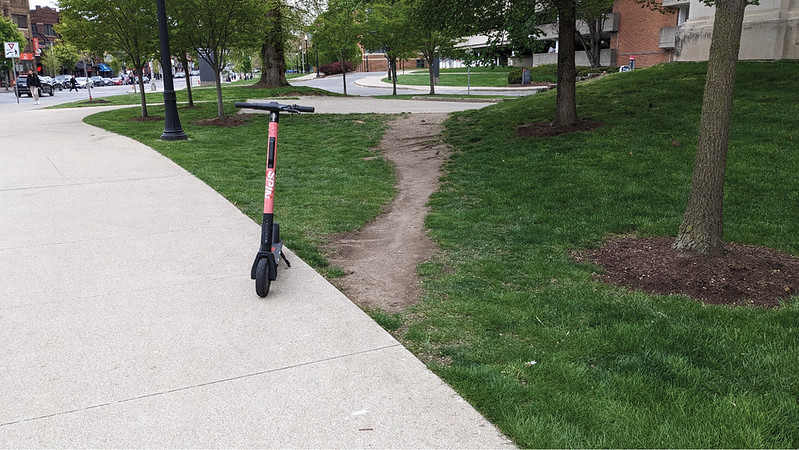
FIGURE 1.2 A desire path carved between the walkway and adjacent parking lot behind a building.
At first, these unplanned trails might just look like inefficiencies: people bypassing carefully laid-out paths in favor of their own. They emerge when enough people share the same impulse to step off the paved route, eventually carving a new trail that reveals a gap between intended design and real-world behavior. It’s tempting to see desire paths as a result of a failure of design. Or to only see them through the clarity of hindsight: How could they have gotten that so wrong! In reality, every product is just a hypothesis frozen in time, an informed attempt to address users’ needs based on the available information. And like hypotheses, products are tested continuously. People, often without intending to, expose mismatches between design intent and lived experience (see Figure 1.3).
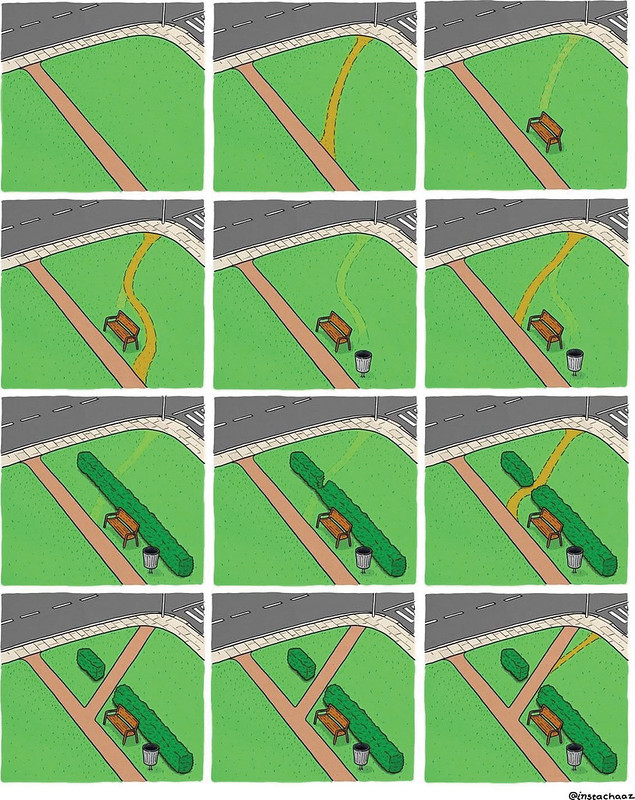
FIGURE 1.3 The work of design is never done because human needs are in constant flux and so designs evolve.
The traces that actions leave behind tell a visible story of human needs. When people fold the corners of a book page into a dog ear, they are marking their place in a novel. When someone tapes over a laptop camera, they are trying to improve their personal security. When someone slings their legs over the arm of a chair into an indentation, they reveal how they like to relax. These residues of human action can also become signals for change. When needs aren’t fully met, people leave behind evidence of their adaptations. Although some might abandon a product or experience, others create their own shortcuts. These symbolic and physical desire paths aren’t just signs of unmet needs, they are opportunities. They offer a chance to uncover what changed, where friction exists, and what gaps might need to be examined in your understanding of people’s needs.
Keep this in mind! Physical actions leave a trace. People’s past behaviors constantly reveal something about their needs and underscore opportunities. The body talks in many ways, so listen! ?
Gestures bridge your organization and your users, helping your team develop empathy for the people you are designing for. They bridge people and ideas, turning a creative spark into a shared reality. They bridge diverse expertise, perspectives, and priorities by linking members of different teams. They even bridge the past and the future, connecting a user’s past frustration to better design decisions.
Seen this way, gestures aren’t just isolated events; they are the through line in the journey from nothing to something. Using gestures well means consciously integrating what makes this process human. You live in and through a body. You engage the world with it, and you challenge the world through it. By attending to the body, you bring that fundamental human reality into the enterprise of making things for other people.
When leveraged effectively, gestures add a valuable layer of information, giving them a unique ability to enhance human-centered design throughout the entire product development process, from discovery to delivery. By incorporating gestures into your product toolbelt, you gain a new superpower that opens up creative avenues for developing products that meet real needs, enrich lives, and, if you’re fortunate, stand the test of time.
Gestures, simply put, do something for you in the product journey.
Navigating the Product Landscape
One important way that gestures drive action is that they help you navigate the twists and turns of product development. Product development isn’t a single road leading from an idea to a finished product. It’s a network of paths, filled with convergence, divergence, and realignment as teams work toward a shared goal.
The metaphor of a product roadmap may make the journey seem linear and well-understood, but in reality, product teams are constantly shifting between exploring new directions and coming back together to make decisions. This complex terrain is often a tangle of overlapping efforts (see Figure 1.4).
Some teams run ahead, scouting what’s possible. Research might be gathering insights for a feature that won’t be built for months, while engineering builds out technical capabilities. Other teams move in parallel, tackling different aspects of the same problem. And at key points, teams must converge to align on a shared direction before work can move forward.

FIGURE 1.4 Reaching the goal of a product requires navigating a tangle of pathways.
To move forward effectively, you need to not only know what path you’re on but also be open to the paths that emerge. The main paths you will navigate in the broader product journey are the following:
- Research path: You gather evidence to ground decisions in real human behavior, providing the context and proof needed to move in a truly human-centered direction.
- Collaboration path: Your team strengthens its vision by blending diverse expertise, balancing aspirational goals with practical considerations to ensure inclusive and comprehensive decision-making.
- Design path: You translate research insights and collective ideas into concepts and potential solutions, seeking creative approaches that feel natural and effectively meet user needs.
- Innovation path: You venture into uncharted territory to explore new markets, pressure-test core assumptions about the problem space, and spark entirely new directions for the business.
These paths aren’t necessarily sequential, and changing priorities can cause you to jump between them rapidly. But when you know which path you are on in the project journey, you can navigate with intention and better see how gestures connect and guide your team’s progress.
Know Your Goals
Product organizations are guided by an overarching goal, their North Star. For many of you, this is creating a human-centered product that meets the real needs of people. In the rush of daily decision-making, you can sometimes lose sight of what you’re moving toward. The compass for navigating the many pathways in the product journey is comprised of knowing your goals. And knowing your goals has the added benefit of helping you see how gestures steer your progress.
An outgrowth of knowing which path in the product journey you’re on is that it helps you frame how to make use of gestures along the way. Not every gesture is meaningful for every moment. A sharpened focus allows you to filter out the noise and recognize the ones that support your immediate objective, while still keeping you oriented toward the destination ahead.
NOTE: STAY OPEN TO NEW DIRECTIONS
Find a balance between being attuned to what may support your goal, while staying open enough to see the unexpected.
Attend to Gestures That Matter
Not all gestures are created equal. Some hold a lot of meaning, others very little, and some none at all. Some can be large yet empty; others are small but densely packed with information. Some simply echo what’s already conveyed in speech, while others add depth and detail you can’t get from words alone.
No need to track every flick of the wrist or twist of the torso. The gestures that matter are the ones that help move your product work forward. In meetings, stand-ups, design reviews, workshops, and user sessions, look at the gestures that surface insight, clarify meaning, and spark new direction. These are the gestures that are more than background. They are tools. Use these to make ideas tangible, build team creativity, foster safety, and anchor design in real human experiences.
You’ll learn how to spot and use these gestures throughout the chapters to come. For now, remember this: gestures that matter are the ones that appear in the flow of product work and do something. They add nuance, surface insight, and spark collaboration, helping you move further on the journey toward products that truly resonate.
Don’t Worry, You’ve Got This!
Humans are inherently expressive, kinetic beings who are constantly engaged in a silent choreography of movement and words. Infants gesture with intent before they can speak. Parents use gestures to gently chide a child at the dinner table, colleagues gesture to emphasize a point, and you gesture to illustrate concepts. It’s as fundamental to human behavior as laughing, crying, eating, or sleeping. Everyone gestures, and everyone gestures a lot! It’s simply what humans do.
People are also instinctively adept at composing their gestures and effortlessly skilled at interpreting those of others. You know a head shake in the Western world means “no” without thinking about it, and you understand that a tap to the wrist, with or without a watch, signals time. This fluency is automatic, it’s intuitive, and it’s largely subconscious. But when you raise your awareness and step beyond instinct, the value of gestures amplifies. Using gestures to enhance your work isn’t about mastering something new; it’s about refining what you already do. The more you practice, the more natural it becomes.
Don’t worry. You’ve got this.
Prepare for Your Journey
Going deeper with gestures unlocks a new level of understanding— one that sharpens how you build products for and with people.
No matter what path you’re on, gestures help you do more. They can drive you toward deeper user insights, more inclusive and effective collaboration, more user-centered design, and more innovative products. They can help you navigate the curves and crossroads of product development. Watch them. Use them. Let them guide the way.
Grab your field notebook. Unfold your map. Open your eyes. And let the journey begin!
Takeaways
- You need to go deeper than what users say. Product development tools are often biased toward language, causing teams to miss critical insights. To truly understand user needs, you must look beyond words to what the body does.
- Gestures are functional tools for doing work. More than just “hand waving,” gestures actively support the product journey. They are tools that can be used to support thinking, enhance communication with layers of meaning that words lack, and coordinate action among people and teams.
- Know your goal to focus on the gestures that matter. You don’t need to track every twitch and shrug. By understanding which path of the product journey you are on—be it research, collaboration, design, or innovation—you can intentionally focus on the specific gestures that will provide actionable insight and help move your work forward.
- This is not a new skill to learn, but an innate ability to refine. You are already an expert at instinctively interpreting and using gestures. The goal is to bring this subconscious, fluent ability into your conscious professional practice. This reframes the challenge from learning a complex new discipline to simply sharpening a natural human skill you already possess.
FIELD NOTES FROM DANE
 As part of my job, I regularly have access to the recordings from various product leadership meetings. These gatherings are often long, jargon-laden, and at a business level that is beyond what I might think about day-to-day. When I’m busy, which, let’s be frank, is all the time, I am often tempted to just use a redux of these meetings, like the transcript or even an AI-generated summary.
But I often reflect on what I might be missing. Was there some unspoken gap in how members of the team were discussing the roadmap? Did someone subtly signal their authority, perhaps by raising a hand to quiet the room during a heated debate, revealing who the ultimate decision- maker really is? Would I have taken notice of the PM leaning back in their chair, disengaged while the engineers hash out technical details, a subtle signal suggesting this discussion may not be crucial for product direction and more about backend architecture.
So much of the knowledge that I rely on to make adept and strategic decisions in the product world simply is not captured in the transcript of a meeting. When I only pay attention to language, I miss out on the important aspects of team dynamics that are not possible to capture in language alone. Maybe you’ve noticed similar dynamics in the meetings you attend as well. It doesn’t take formal training; it takes practice. When you rely on your intuitive and innate ability to interpret gestures, you can do it, too.
FIELD NOTES FROM STEPHANIE
 As a former professional dancer (see Figure 1.5), I learned quickly that running choreography full out every time was inefficient. It takes stamina. So, instead of rehearsing with the entire body, dancers often let their hands do the dancing. We call this marking. Marking is a dancer’s shorthand: a reduced version of the movement performed through the hands. Standing in place, a dancer can replay an entire sequence with small gestures. A curved hand traces the larger pathway of the arms. A quick swirl of the finger signals a turn. A pause holds the timing of a phrase. The full dance is still there, but just compressed into the hands.

FIGURE 1.5 Stephanie performing at the Joyce Theater in NYC.
Dancers use marking to recall sequence, check timing, and work through transitions without expending the energy of a full performance. But marking is not simply a private cognitive aid. It is also a social and communicative act. As a teacher, I often use my hands to mark combinations for dancers. Without moving across the floor, I can show where the body travels, how timing unfolds, and how one movement connects to the next. The hands communicate the structure of the dance. They enact its direction, rhythm, form, and sequence. This is what makes marking so effective. It reduces the effort required to think through, remember, and communicate complex movements while preserving the essential features of the idea.
Excerpt from Body Talk: Using Gestures to Rethink Human-Centered Products. Rosenfeld Media, 2026.
Read the first chapter of What Your Machines Should Do by Stefanie Hutka
AI is just automation’s latest chapter—yet too many organizations chase fully automated futures untethered from readiness and customer value. What Your Machines Should Do closes that Automation Strategy Gap. Stef Hutka draws on decades of lessons from human factors, HCI, cognitive science, and systems thinking to help you automate with intention: setting deliberate direction, sequencing rollout, and making grounded day-to-day decisions.
Read chapter one for free below!
Chapter 1
Dreams of Automated Futures
Close your eyes and picture “the future.” (Go ahead, I’ll wait.) What did you see? Robots folding your laundry? An AI agent answering all your emails? Skies filled with delivery drones? Chances are your vision of the future included machines doing more for us than they do today.
If so, you’re not alone. Society’s cultural imagination has long equated the future with automation. Sometimes, the vision is dystopian, like Karel ?apek’s 1920 play, Rossum’s Universal Robots: robots built to free humans from labor ultimately revolted, driving humanity to the brink of extinction. Other times, it’s utopian, like the 1960s cartoon The Jetsons, with flying cars zipping between skyscrapers and Rosie the robot keeping the family home spotless.
NOTE: FROM FICTION TO ROADMAP
The role of automation within fiction doesn’t just influence cultural imagination. It also plays a role in shaping the technologies we build. For instance:
- The word robot comes from ?apek’s play, and is based on the Czech word robota, meaning forced labor. ?apek’s robots were synthetic beings created to do unwanted work, foreshadowing today’s debates about machines replacing human labor.
- Rosie from The Jetsons would go on to inspire the invention of the Roomba, the autonomous robotic vacuum cleaner. Colin Angle, CEO of iRobot, the company that created the Roomba, has said Rosie sparked their initial interest in building cleaning robots.
Why the Future Never Quite Arrives
It should come as no surprise that visions of automated futures also serve as a North Star for business executives. Take General Motors chairman and CEO Roger B. Smith. In the early 1980s, General Motors was in trouble. They were facing mounting financial losses and growing competition from Japanese automakers. Smith, looking to revitalize the company, turned to aggressive automation to transform manufacturing efforts, inspired after touring a Toyota plant. His vision was a “lights-out” factory of the future: a robot-led operation with so few humans that the lights could be turned off.
General Motors was set to scale from just 302 robots in 1980 to a projected 14,000 by the end of the decade. A plant in Saginaw, Michigan, was to be the crown jewel of this operation: a robot-run facility that would boost productivity by 300%. However, there was a gap between Smith’s vision of full automation and the reality of execution: the robots couldn’t reliably distinguish between car models. They attached the wrong parts. They painted each other instead of the vehicles. With costs exceeding those of traditional unionized plants, the Saginaw factory eventually closed in 1992. All said, these automation efforts were (conservatively) estimated to have cost General Motors around $40 billion, equivalent to about $95 billion in 2026.
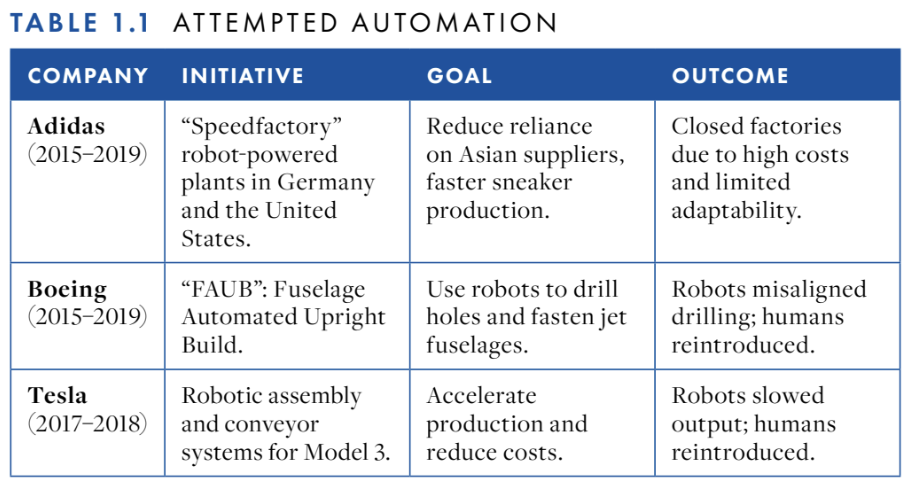
Surely, the General Motors case study would serve as a cautionary taleagainst defaulting to a fully automated vision of the future. Except you don’t need to look far to see this pattern repeat with several other high-profile companies, such as Adidas, Boeing, and Tesla (Table 1.1). Ambitious attempts at doing away with humans gave way to costly failures, and often, bringing back the very humans the machines were supposed to replace.
Just when you thought this was a book about the challenges of automating manufacturing with robots, you get the story of Klarna, Swedish fintech company, and their attempt to automate customer service with AI. In 2023, Klarna’s CEO Sebastian Siemiatkowski decided to embrace an “AI-first strategy,” integrating ChatGPT into its customer service operations. By February 2024, they had launched an AI assistant that, within its first month, fielded about two-thirds of customer chats—some 2.3 million conversations. That same year, Klarna imposed a hiring freeze, added on top of a nearly 40% workforce reduction since December 2022.
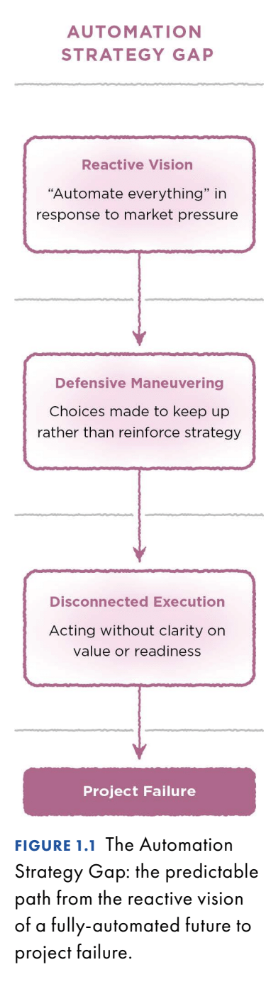
Klarna touted their AI assistant as a breakthrough, claiming it could replace the work of 700 human agents. Yet, by May 2025, Siemiatkowski announced Klarna would start rehiring staff because customer service quality was plummeting. Customers were getting stuck in long back-and-forth conversations with a chatbot and receiving unempathetic responses to sensitive questions about payment issues. Sometimes, the responses were flat-out incorrect. Despite a different use case, technology, and decade, the Klarna example fits the pattern: bold visions of full automation collapsing under real-world complexity. This pattern is modeled in the Automation Strategy Gap.
The Automation Strategy Gap
The Automation Strategy Gap is the misalignment between an organization’s automation aspirations and the realities of what is required for successful implementation (Figure 1.1). This gap results from a predictable pattern that begins with a reactive vision of full automation in response to market pressures. This initial reactivity sparks a chain reaction that results in execution that is detached from automation value and the organization’s ability to move from automation idea to implementation (organizational readiness). The result is that the promised future of machines replacing their costly human counterparts never arrives, leaving organizations with losses and pun-laden headlines (see the 2024 New York Times’“260 McNuggets? McDonald’s Ends A.I. Drive-Through Tests Amid Errors”).2
From Market Pressures to Reactive Visions of Full Automation
The vision of a fully automated future is hard to resist. It’s a story written into our cultural imagination from science fiction, offering the promise of lower costs, higher productivity, and competitive advantage. These promises feel closer than ever as automation-enabling technologies advance at an unprecedented pace and scale. At present, this push is largely driven by generative AI development.
2. Hank Sanders, “260 McNuggets? McDonald’s Ends A.I. Drive-Through Tests Amid Errors,”New York Times,June 21, 2026.
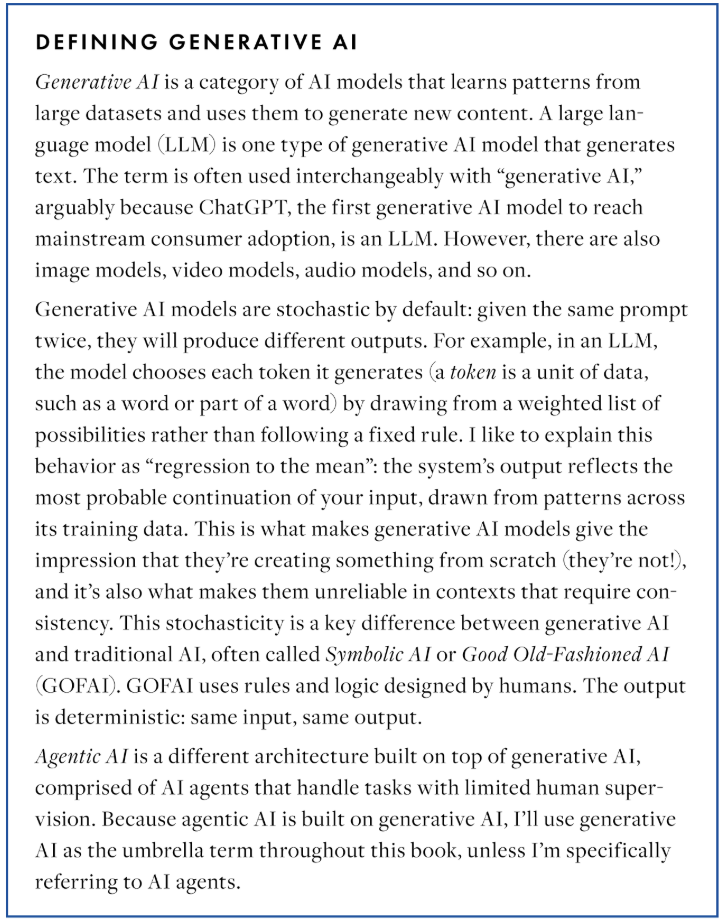
Generative AI systems are increasingly able to perform tasks that were once considered exclusive to humans. With a few natural language inputs, generative models create everything from high-fidelity prototypes, to working code, to your headshot in the style of Studio Ghibli. These systems are only getting better—potentially, a lot better.
There is widespread consensus across the technology industry that artificial general intelligence (AGI), systems that match human capabilities across all cognitive tasks, is inevitable. Most surveys of AI researchers and experts indicate a 50% probability of achieving AGI between 2040 and 2061.3 Regardless of your views on the merits of the AGI mission, you can agree that investment is staggering. UC Berkeley professor Stuart J. Russell estimates that projected AGI funding, adjusted for inflation, has already reached 10 times the cost of the Manhattan Project as of 2024. On the current investment trajectory, Russell expects that number to rise to 25 times in the coming years.4 Because of this, it feels like there is no technical ceiling to what you can automate. What seems impossible today may soon become feasible with enough data, computing power, and new methods. Furthermore, AGI isn’t even the end goal. At the time of writing, several frontier AI companies, such as OpenAI and Meta, have already shifted their ambitions past AGI toward artificial superintelligence (ASI), systems that surpass human capabilities across domains.
Beneath this momentum is a rarely examined assumption: human thinking is a process that can be separated from the thinker and reproduced by a machine. If that assumption is true, then full automation is just an engineering problem on a timeline. If it isn’t (decades of cognitive neuroscience research suggest it isn’t, see Chapter 11), then the destination of “automate everything” needs rethinking.
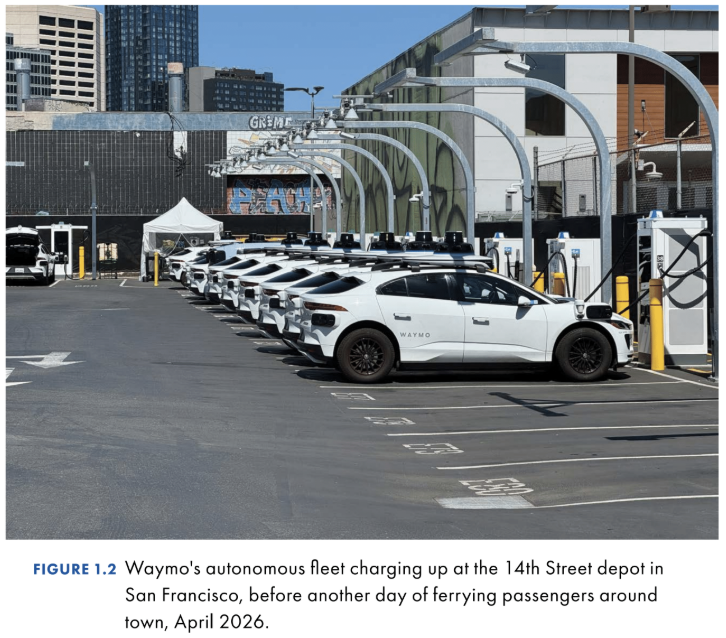
AI’s momentum is also no longer confined to software or knowledge work; it’s rapidly taking physical form. Stroll down any street in San Francisco, and there’s a good chance you’ll see more than one autonomous vehicle shuttling its passengers to their destination (Figure 1.2). Companies like Figure AI, valued at $40 billion in 2025, are designing humanoid robots for both industrial and domestic tasks. At the same time, Fei-Fei Li’s World Labs is building “spatial intelligence,” the capacity for AI systems to perceive and interact with the three-dimensional world, much like LLMs interpret and generate text. Meanwhile, companies such as ElliQ are creating AI companions to support aging populations.
3. Cem Dilmegani and Sila Ermut, “AGI/Singularity: 9,800 Predictions Analyzed,” AI MultipleResearch, May 2026, https://research.aimultiple.com/artificial-general-intelligence-singularity-timing
4. Tharin Pillay, “Stuart Russell,” Time100 AI 2025,Time, August 25, 2025, https://time.com/collections/time100-ai-2025/7305869/stuart-russell/
From Reactive Vision to Defensive Maneuvering
In this reactive state, visions of a fully automated future often collapse into defensive maneuvering (Figure 1.1), sometimes labeled as strategy but lacking in substance. True strategy is about the choices you make about where in the market to compete and how you succeed in that niche. What, then, does it mean when an organization declares it’s taking an “AI-first strategy”? Take Duolingo: CEO Luis von Ahn sought to transform the language-learning company into an AI-first operation by phasing out contractors where AI could replace them, while restricting new hires to work that couldn’t be automated. The move drew backlash from both employees and customers.
Imagine replacing “AI” with any less flashy technology in a sentence. Am I a Word-Document-first author? Will you hire hammer-first contractors for your next home renovation? These are nonsensical declarations, prioritizing signaling your use of a technology tool over the purpose it is meant to serve. Technology is the means to an end, rather than an end in itself. Automation choices are strategy choices that reinforce where you’ll play and how you’ll win in the market,5 and intentional choices are better than reactive ones (see “The Automation Choice Check Activity,” Chapter 6).
From Defensive Maneuvering to Disconnected Execution
When strategy starts with technology, execution is disconnected from the value that it should deliver to customers and the organization’s capacity to deliver it (Figure 1.1). The disconnect often stems from leadership and teams operating from two different pictures of reality. Leadership tends to overestimate what the technology can do and underestimate the effort required to implement it well, communicating in big picture business goals and outcomes. Teams closer to the work see the technology’s shortcomings up close and feel gaps in organizational readiness. Both sides lack feedback loops and shared language that would keep each other grounded in what the other is learning. This often shows up as leaders who are pushing teams to use AI where it doesn’t create differentiating value, underestimating the time and training required to make a model work in the real world, or teams burning cycles trying to interpret what leadership wants instead of innovating.
5. This is a nod to A.G. Lafley and Roger L. Martin, Playing to Win: How Strategy Really Works (Harvard Business Review Press, 2013).
TIP: KEEPING TECH DISCUSSIONS GROUNDED
Does this disconnect feel familiar? Here are three questions you can ask in your next meeting to ground the conversation:
- What’s the unique value here?: How does using this technology create an advantage over what people do today? What does this technology (say, generative AI) do that other technologies (say, discriminative machine learning models) cannot?
- How are we testing feasibility? Do we have evidence, such as benchmark data or a pilot study, that supports that the tech can deliver what we think it can deliver? Do we have a plan to collect that evidence?
- Are we resourced for this? Have we scoped the data and training time required to make this work at scale? Do we have the in-house expertise to pull this off or will we need to bring in vendors or consultants?
When leaders issue mandates like “use AI to personalize all marketing emails,” they often underestimate what’s required. Effective personalization requires clean (and consented!) customer data, integration across fragmented systems, and careful review to avoid generic or off-brand copy. While off-the-shelf tools can handle basic segmentation, scaling true one-to-one personalization usually demands significant resources in data engineering, orchestration, and oversight.
Sometimes, teams spot the risks but lack the language to translate them into business terms. Other times, even seasoned engineers are surprised, because building intuition for what today’s fast-moving systems can and can’t reliably do requires regular hands-on experimentation. Without clear feedback loops between leadership and teams, organizations keep executing against flawed assumptions, defaulting to vanity metrics like open rates, or send volume instead of outcomes, like customer satisfaction and successful request resolution. The result is an illusion of progress, even as customer experience suffers. Dropping support ticket resolution times from eleven minutes to two minutes means nothing if your customer is rage-quitting because they were trapped in an infinite loop with an unhelpful AI agent.
Outcomes
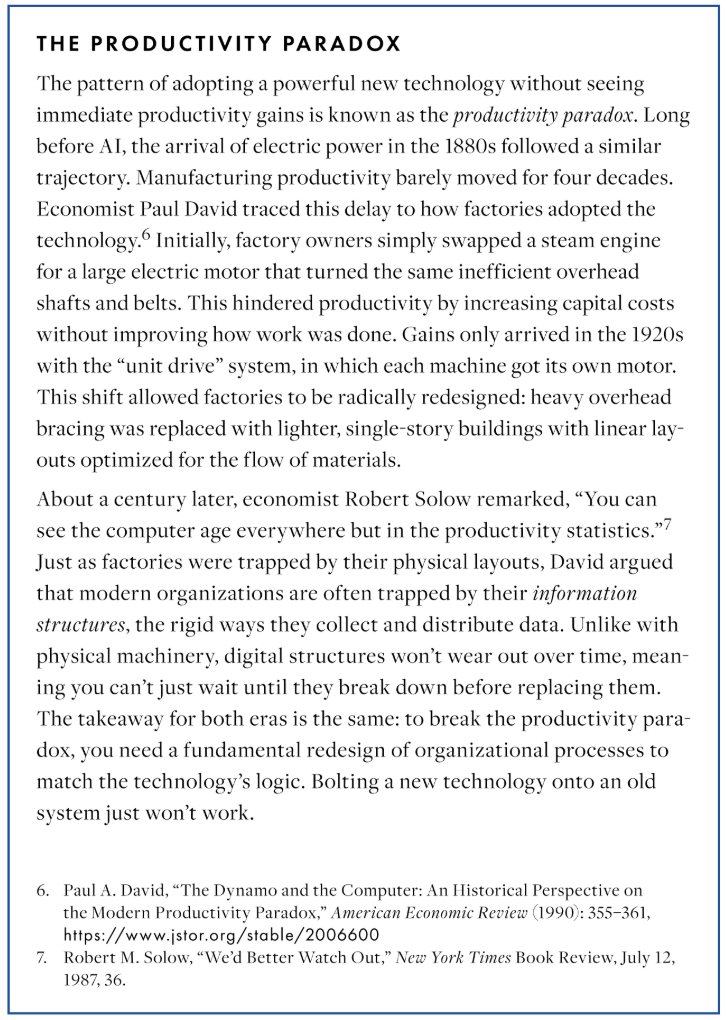
The outcomes of projects that succumb to the Automation Strategy Gap are predictable: underwhelming results or outright project failure. A 2024 Rand Institute study estimated that over 80% of AI projects fail, which is nearly double the failure rate of traditional IT efforts. In IBM’s 2025 study of 2,000 CEOs, 64% of CEOs reported that fear of falling behind drove them to invest in new tools before fully grasping their value. In that same study, only 25% of AI initiatives have delivered their expected ROI, with just 16% scaling enterprise wide. The National Bureau of Economic Research’s 2026 working paper on AI adoption surveyed nearly 6,000 business executives across the U.S., UK, Germany, and Australia, finding that while 69% of firms used some form of AI, 90% of executives reported that AI had no impact on their firm’s employment or productivity over the last three years.
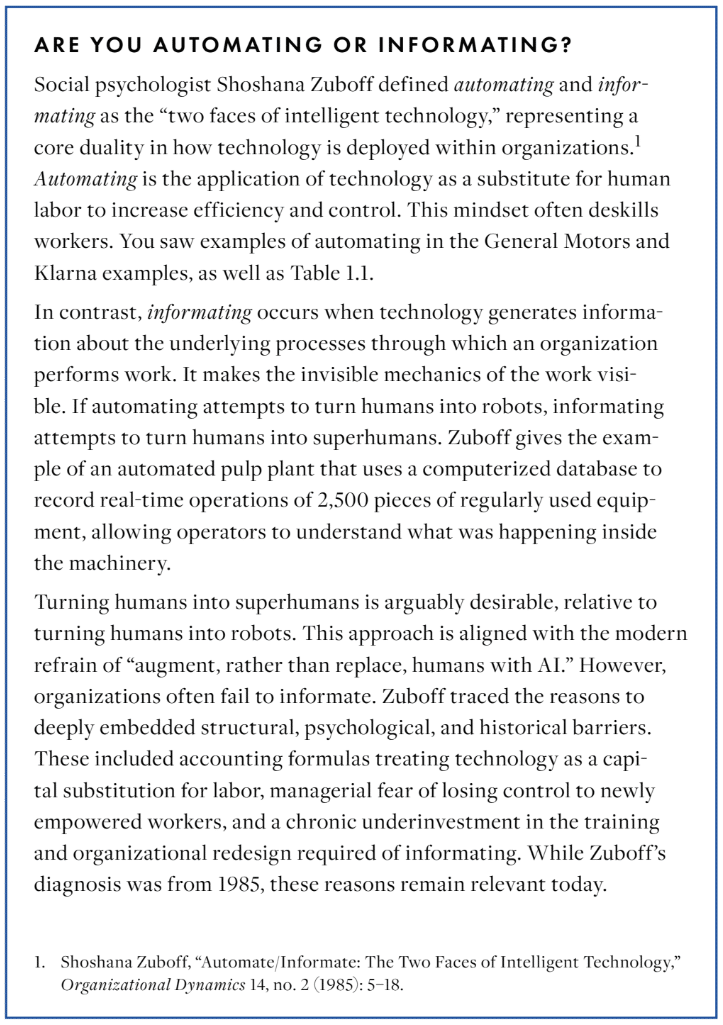
By now, you might be thinking the Automation Strategy Gap is impossible to close. Organizations seem cursed to repeat the patterns of Zuboff’s “automating” instead of “informating” (see Chapter 5 for a detailed explanation 0f why this occurs). Don’t give up hope yet. There are companies that have closed the gap through an intentional approach to automation.
Automating with Intention
Sometimes, automation really does deliver. FANUC, a Japanese robotics company, has been running a lights-out factory near Mount Fuji since 2001, with the capacity to produce over 11,000 robots a month with minimal human oversight. Ocado, a British grocery technology company, offers another automation success story. Founded in 2000, the company sought to rethink grocery retail through an online-only model coupled with a highly automated warehouse. They steadily scaled their operations to their present-day “Hive” system, where AI-powered robots navigate across a vast 3D grid holding thousands of grocery items. The system can pick and pack a 50-item customer order in five minutes (about six times faster than manual picking). Humans are still in the picture, performing tasks such as system maintenance and loading completed orders onto delivery vehicles. In the digital realm, Boston Consulting Group (BCG) reported that just 4% of companies reported meaningful returns from generative AI as of 2024, but the common thread is the same: they applied the technology to carefully chosen use cases that created value rather than simply cutting costs.
A common approach underlies each of these successes: automation pursued with intention. That approach can be broken down into a pyramid: intentional automation outcomes at the top, three pillars holding it up, and principles forming the base (Figure 1.3).
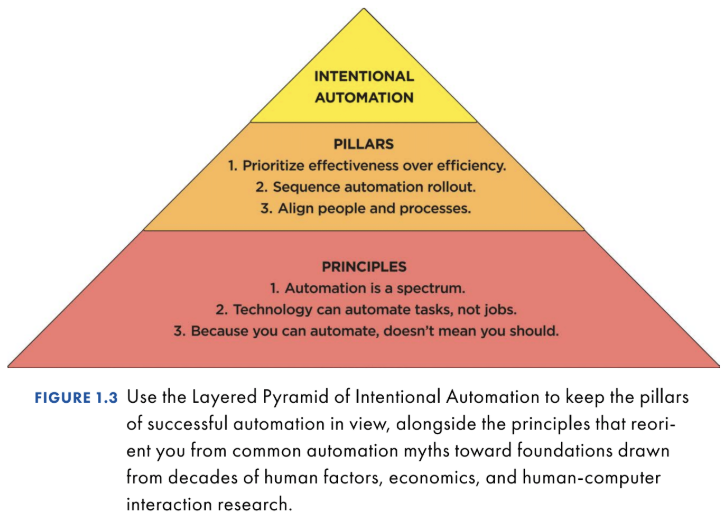
The Three Pillars of Intentional Automation
The three pillars of intentional automation capture the common patterns behind organizations that succeed with automation. They are the following
- Prioritize effectiveness over efficiency.
- Sequence automation rollout.
- Align people and processes.
Prioritize Effectiveness over Efficiency
Organizations that use automation to transform their core business, rather than merely to cut costs, tend to be successful. FANUC envisioned scaling production and achieved it with robots building robots. Ocado pictured a new way for people to buy groceries, achieved by a combination of e-commerce and advanced automation. In the BCG study, leaders who saw returns on generative AI investment framed the technology as a source of revenue growth, not just cost-saving efficiency. The through line is that these organizations all used automation to become more effective (not just efficient), in a way that actualized their vision for the future. Automation was a means to an end, not an end in itself.
Sequence Automation Rollout
Success comes from narrowing focus to a few high-value opportunities and sequencing them with intention. For instance, Ocado achieved its sophisticated Hive system over several iterative stages. They began with off-the-shelf hardware, such as conveyors and cranes, coupled with proprietary software. Over several years and iterations, they developed the Hive storage and retrieval system, in which robots would grab crates of items and take them to pick stations. AI robotic arms that could pick directly from the crates came later. The BCG example demonstrates the importance of focusing on high-value use cases rather than solely chasing cost-cutting. Here, intention showed up as discipline: organizations resisted the urge to automate everything at once and instead made deliberate choices about where automation would matter most.
Align People and Processes
While building advanced technology is hard, it’s not the hardest part about automation. That would be aligning people and processes with the technology. Successful automation requires organizational change management: stakeholder alignment, workforce preparation, and redesigning workflows alongside automation implementation. The most technically advanced generative AI systems are of little use if you don’t have a coordinated approach to how your organization will learn and use them, and to what end. This misalignment can occur on multiple axes, such as what to automate, how to automate, and when to automate.
A related challenge is the mismatch between the rapid pace of individual adoption and the slower rollout of organizational infrastructure. People use generative AI tools to build things they couldn’t build a year ago, but the systems for sharing, evaluating, and scaling that work often don’t keep pace. Aligning people and processes means investing in building the scaffolding of organizational readiness (more on this in Chapter 3).
The Three Principles of Intentional Automation
If the pillars describe the structure of successful automation, the princi-ples are the foundation beneath them. They are the beliefs that supportintentional practice and help prevent organizations from falling into theAutomation Strategy Gap. No matter what your role is, the following princi-ples are important to internalize:
- Automation is a spectrum.
- Technology can automate tasks, not jobs.
- Because you can automate, doesn’t mean you should.
Automation Is a Spectrum
Automation is the use of machines to do tasks—sometimes just part of the task, sometimes the whole thing—that people used to handle themselves. It’s a spectrum, not a binary switch. At one end, humans handle everything; at the other, machines act entirely on their own. In between are levels of automation where the machine performs increasingly more of the task.
How many levels are there? It depends on who you ask. In a classic human factors paper, “A Model for Types and Levels of Human Interaction with Automation,” there are ten levels. The spectrum starts with “The computer offers no assistance: humans must take all decisions and actions” (level 1), moving through the computer “executes the suggestion if the human approves” (level 5), and ending with “The computer decides everything, acts autonomously, ignoring the human” (level 10).8 In the automotive industry, the National Highway Traffic Safety Administration defines a six-level scale for vehicle autonomy. It runs from level 0, where the human does all the driving, to level 5, where the car handles everything and the human is just a passenger. The in-between steps move from more human involvement to less human involvement. For instance, in level 3, the car drives but a human must be ready to take over.
The exact number of automation levels is secondary to the key point: if you triangulate across autonomy research, autonomy is consistently a spectrum. You have options beyond “people do all the things” and “automate everything, now.” For practical purposes, think of automation as having four levels (Figure 1.4).
8. Raja Parasuraman et al., “A Model for Types and Levels of Human Interaction withAutomation,”IEEE Transactions on Systems, Man, and Cybernetics—Part A: Systems and Humans 30, no. 3 (2000): 286–297, https://doi.org/10.1109/3468.844354. This paper is cited over 5,550 times at the time of writing. The authors must have been onto something!
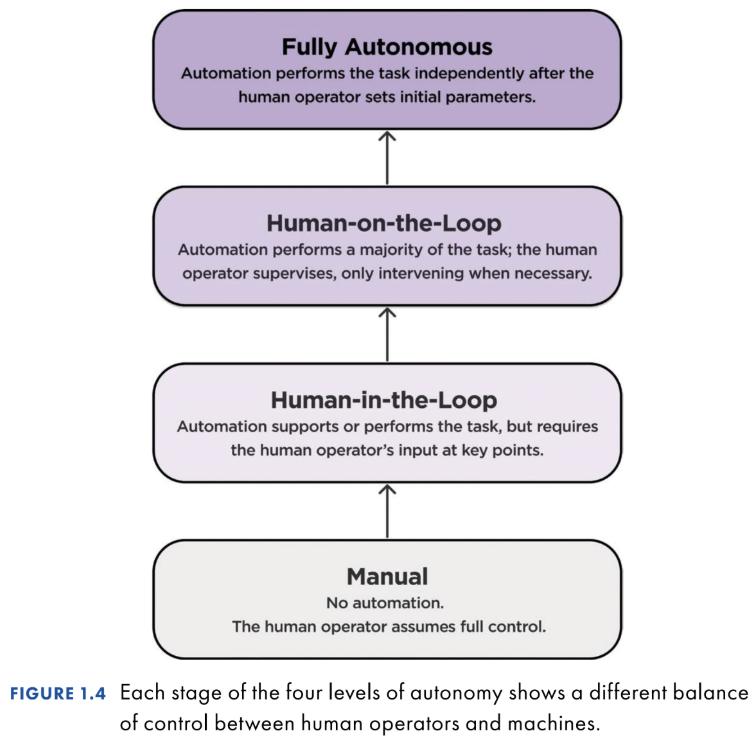
The lowest level of automation is manual mode, where a human operator has full control of the task. Next is human-in-the-loop (HITL), where the human remains the primary decision-maker, while the system carries out the human’s plans. Because the human operator’s input is required during some parts of task completion, they’re more actively evaluating what the system is doing and why it is doing it.
One level up from HITL is human-on-the-loop (HOTL), where a system can make and carry out its own decisions while a human supervises. While no longer the primary decision-maker (unlike in HITL), it’s vital that the system is designed so that the human operator retains situational awareness of what the system is doing (see Chapter 9). After HOTL, you reach fully autonomous systems. Here, the system operates independently after the human operator sets initial parameters. Unlike in HOTL, there is no routine human oversight.
To bring these levels to life, consider the example of flying an airplane. At the manual level, the pilot flies the plane, directly controlling speed, altitude, and direction. With HITL, the pilot sets parameters, such as flight path and altitude. An autopilot system executes these commands while the pilot remains the primary decision-maker.
Moving up in autonomy level to HOTL, the autopilot system can make and carry out its own adjustments, such as detecting turbulence and automatically changing altitude or speed. The pilot supervises to ensure that the system behaves appropriately. Finally, with full autonomy, the pilot inputs only the origin and destination, and the autopilot independently manages the entire flight, including navigation, responses to weather, and landing, without routine oversight.
As the level of autonomy increases, the pilot’s primary role shifts from doing, to deciding, to supervising, to being removed from the operational loop altogether. Delegating more of the task to machines fundamentally changes the pilot’s mental workload. Monitoring tends to be more boring than doing, so it is easy to lose situational awareness of what’s happening unless the system is designed to keep you aware of its status. Hands-on skills also tend to fade once you stop using them. Together, these set up a well-documented paradox in the human factors literature, the “Ironies of Automation”: automating the easy parts of a task can make the remaining hard parts even harder.9 The human operator needs to jump back into complex, high-stakes situations precisely when their situational awareness and skills have eroded. That’s why automation design requires careful judgment about which tasks to allocate to machines, and how to keep humans aware of what the system is doing when they’re no longer in the loop.
9. Lisanne Bainbridge, “Ironies of Automation,” in Analysis, Design and Evaluation of Man–Machine Systems, ed. G. Johannsen and J. E. Rijnsdorp (Pergamon, 1983), 129–135.
Technology Can Automate Tasks, Not Jobs
People perform a wide variety of tasks throughout their day. For instance, a designer might create wireframes in Figma, run a usability test with a participant, and prepare a slide deck about their design work for stakeholders. Each of these activities is a distinct task (with multiple subtasks, see Chapter 4), even though they all fall under the same job title.
When someone claims they can automate (read: replace) the designer—or the factory worker, or the customer service agent—chances are, they don’t have a clear picture of what the potentially replaceable person does all day, and how their actions fit within their broader environmental context. Selecting the right level of automation to extend people’s effectiveness depends on a clear understanding of workflows and the contexts in which tasks unfold.
Jobs can’t be automated in one sweep because they aren’t single, uniform activities. They’re made up of many different tasks: an economics concept called a task framework. Some tasks are structured and repeatable, while others are complex and judgment driven. Production relies on allocating these tasks across humans, machines, or some combination of the two.
This task perspective connects directly to the first principle—automation exists on a spectrum. Assuming the technology is capable, some tasks lend themselves to near-full automation, while others require oversight, and some resist automation altogether. In design work, generating interface variations can be automated through vibe coding, while deciding what concept to prototype requires expert human judgment. But what if technology got really, really capable, such that it could do everything that a human can currently do? Shouldn’t everything be automated?
Because You Can Automate, Doesn’t Mean You Should
Imagine a future where technology could automate nearly every human task. In this hypothetical world of technological abundance, would everything be automated? Economists have long been thinking about this question. One such economist, Daniel Susskind, has argued that even if machines surpass humans at all economically useful tasks, there will still be reasons for people to remain involved. These limits exist because society will still require human participation in three ways:
- General equilibrium limits: Humans may remain relatively better than machines at edge cases. For example, AI can read most medical scans faster and more accurately, but radiologists are still needed to adjudicate rare, ambiguous cases where decisions require more real-world context than machines can access.
- Preference limits: People may prefer human processes even when machines are capable. For instance, some guests will choose a restaurant with human servers over one staffed entirely by robots, valuing the experience of personal interaction.
- Moral limits: Certain decisions demand human accountability. Incriminal justice, even if highly accurate risk assessments were possible,society expects a human judge to decide sentencing, making moral judg-ments that require human accountability.10
Returning to the present day: technology for automation remains imperfect. Organizations therefore face two fundamental questions: could you automate this task and should you? The first is about technical and organizational maturity: can the technology do what you want it to do, and can your organization effectively work together to implement it? The second is about whether the technology solution creates unique value for people—a step-change improvement in how they operate today. When the answers to both questions are “yes,” only then should you consider moving forward with automation.
Takeaways
- Mind the gap. Most failures of automation are the result of the Automation Strategy Gap, a misalignment between an organization’s automation aspirations and the realities of what is required for successful implementation. Market pressures give way to a reactive vision of a fully automated future, which yields defensive maneuvering, disconnected execution, and ultimately, project failure.
- Getting automation right requires intention. FANUC, Ocado, and a handful of generative AI leaders taught us that successful automation requires intention, prioritizing effectiveness even over efficiency, treating automation as a means to reinforce their broader strategy, and investing in organizational readiness.
- Remember the three principles. You don’t need to jump to “full automation”: you have options on the automation spectrum. Think about automation at the task (not job) level. Evaluate automation choices through the lens of “should you,” not just “could you?”
10. Daniel Susskind, What Will Remain for People to Do? (Knight First Amendment Institute,April 2025), http://knightcolumbia.org/content/what-will-remain-for-people-to-do
What gestures reveal about users with Dane DeSutter and Stephanie Scopelitis
What if researchers could learn as much from what people do with their hands as from what they say? Lou talks with Dane DeSutter and Stephanie Scopelitis, authors of the forthcoming Rosenfeld Media book Body Talk: Using Gestures to Rethink Human-Centered Products, about the overlooked role gestures play in research, communication, and design.
Drawing on backgrounds that span learning science, dance, music, and product research, Dane and Stephanie explain how gestures can reveal mental models, clarify ideas that are hard to put into words, and open new opportunities for researchers to dig deeper. Rather than relying on intuition alone, they argue that researchers can learn to observe gestures systematically, and use their own gestures intentionally to support richer interactions.
Through examples ranging from a classroom discussion of justice to an engineer describing data integration, they show how paying closer attention to the body can uncover insights that words alone might miss. The payoff: products that make more sense to the people who use them.
What you’ll learn from this episode
- Why gestures offer a window into how people think
- How gestures can reveal mental models that words may not capture
- How researchers can observe gestures more systematically
- Why context and culture matter when interpreting gestures
- How gestures can help researchers ask better follow-up questions
- How understanding embodied behavior can lead to better product design
Q&A with Dane DeSutter and Stephanie Scopelitis
Q: With so much attention on AI, why write a book about gestures now?
A (Dane): As long as people are the ultimate goal of whatever you’re building, whether it uses AI or a technology we haven’t dreamt up yet, people stay at the center. In the book, we describe the body as a bridge: between the person and the experience, and between the past and the future. No matter what frontier you’re working at, you can go back to the person the product is for and build something better because you understand them fundamentally. In that sense, it’s also a bit of an antidote to the “AI everything” mood in the product world.
A (Stephanie): We use our bodies to communicate, to think through things, and to shape our interactions all the time. We’ve done this organically for centuries. We’re pulling it back out of the bag and saying, “Remember this? The body does a lot.”
Q: Don’t researchers already pay attention to body language?
A (Dane): Researchers are astute. No one would sit in on a usability session and only listen to what people say. But “body language” is just a small piece of a much bigger puzzle. You probably already have an intuition for this. What we show is that you can do it systematically. Gestures can tell you what someone thinks, what they’re clarifying as they communicate with you, and how they’re orchestrating their environment. Those become powerful inputs into the product process.
A (Stephanie): It’s not only about observing gestures. You can also use your own gestures intentionally to move the interaction along. It’s a back and forth: give and take, push and pull.
Q: How are gestures different from sign language?
A (Dane): Sign language is a language, with its own grammar and syntax. Spontaneous gestures work differently. There isn’t one way to gesture an idea, and gestures almost always happen alongside speech. They’re global and synthetic, so you understand them by looking at the context and the words that come with them. Without that combination, it’s hard to know exactly what a gesture means. Yet people read them almost instantly in conversation without having to think about it.
Q: What does noticing a gesture look like in practice?
A (Stephanie): When I taught ethics, I interviewed students one-on-one to understand how they were thinking, and I watched their hands. Two students told me the same thing: “Justice is about fairness.” One made a scale with his hands, which matched his words. The other interlaced his fingers. That was a thinking gesture, and because I noticed it, I asked him to tell me more. He said justice is about how a community interacts to give people what they need. That idea was in his hands before it was in his words. Without the follow-up question, I would have heard another simple answer.
A (Dane): Culture shapes gesture just as it shapes language. When you see a common gesture, it’s worth digging in, because it may not mean quite the same thing to that person. Those are the moments to latch onto.
Q: How can gesture help in product research?
A (Dane): I study data professionals, mostly engineers. You might expect them not to gesture much, but it’s the opposite. So much of their world is imagined. You can’t pick up a database and connect it to a script, so they transact with each other in gesture. I once interviewed an engineer who was building an AI agent. As he talked, he kept plucking his hand out into space and pulling toward a central point. He was showing me that he needed to integrate context from different systems. That told me integration was an important concept, and digging into it opened up a whole discussion about his pain points.
Q: Why are gestures so useful for understanding mental models?
A (Dane): Gestures are excellent for understanding, in fine-grained detail, what someone’s mental model is. Whether a gesture is abstract or more literal, it shows you how a person thinks about something, like how points of information are distributed and pulled together. If you can understand how people think, you can design for them and create products that make sense to them. That’s where the magic is.
A (Stephanie): Gestures also give you an opening to dig deeper. A participant might place an idea in the space between you, showing you the object or action as they imagine it. The richness comes from moving between gesture as a window into the mind, as support for communication, and as a way to direct the interaction. That’s how you and the person you’re talking with get to something you might not have reached otherwise.
About our guests

Dane DeSutter is a learning scientist and UX researcher who studies data professionals and the engineers who build with data systems. His work draws on psychology, spatial cognition, and learning sciences research to understand how people think with and through their bodies. A lifelong pianist, he traces part of his interest in embodiment to performing in solo and ensemble settings.

Stephanie Scopelitis is a learning scientist who studies the role of the body in teaching and learning, especially how explanation and understanding unfold between people. A former professional dancer with the Nikolais and Murray Louis Dance Theater, she went on to study the body in religious practice at divinity school. She has taught ethics and teaches a class in a women’s prison.
Dane and Stephanie are the authors of Body Talk: Using Gestures to Rethink Human-Centered Products.
Quick reference guide
0:11 – Meet Dane DeSutter and Stephanie Scopelitis and get an overview of their book, Body Talk
3:25 – Gestures in the UX world
6:53 – The aha moment that made Dane take a closer look at gestures
9:15 – The influence of dance on Stephanie’s work
11:33 – Sign language vs. gestures
13:19 – Gestures in the podcast studio
15:11 – We are all students of body language
19:03 – 15% off Rosenfeld Media book preorders
20:26 – An example from teaching
24:49 – An example from product design and development
26:54 – Using gestures to reveal mental models and deepen understanding
30:42 – Offering and interpreting gestures
33:39 – Dane and Stephanie’s gifts for listeners
37:10 – Why you should try the Rosenverse
Resources and links from today’s episode
Supplement to the Italian Dictionary by Bruno Munari
Solitary Confinement: Social Death and Its Afterlives by Lisa Guenther
What should your machines do? with Stefanie Hutka
As organizations race to automate with AI, the most important question may not be what machines can do, but what they should do. Lou talks with cognitive neuroscientist and UX researcher Stef Hutka, author of the forthcoming Rosenfeld Media book What Your Machines Should Do: The Science and Strategy of Human-Centered Automation, about how teams can make more thoughtful decisions about automation.
Stef introduces the Autonomy Decision Matrix, a framework that asks teams to evaluate automation along two dimensions: Could you automate it? and Should you automate it? Using examples from augmented reality and AI-powered customer service, she explains why technical feasibility alone isn’t enough — and how shared frameworks can help leaders and practitioners make better decisions together.
The conversation ultimately makes the case for “humanist automation”: using technology to extend human capabilities rather than simply replace people. Stef will continue exploring that idea as a curator of the human-centered tooling track at Rosenfeld Media’s upcoming Shift UX 2026, where she and the speakers will examine how our tools are reshaping not only products, but organizations, communities, and society.
What you’ll learn from this episode
- Why “could we automate?” and “should we automate?” are different questions
- How the Autonomy Decision Matrix guides automation decisions
- Why augmentation can be more valuable than replacing people
- How shared frameworks help leaders and practitioners discuss AI
- What “humanist automation” means in practice
- How designers can think beyond today’s tools toward longer-term consequences
Q&A with Stefanie Hutka
Q: What is the most important question organizations should ask about AI and automation?
A: The central question is not, “What can our machines do?” It is, “What should our machines do?” That distinction forces organizations to look beyond technical capability. It asks what people gain or lose, what the business is actually trying to achieve, and whether automation improves the entire system—not just a narrow efficiency metric.
Q: What does human-centered automation mean?
A: Human-centered automation is technology designed to enhance human judgment, capability, and agency rather than remove people by default. Sometimes that means fully automating a routine task. Often, it means creating a productive partnership: the machine handles repetitive work, retrieves information, or identifies patterns, while people retain responsibility for interpretation, empathy, creativity, exceptions, and consequential decisions.
Q: What is the difference between “could we automate this?” and “should we automate this?”
A: “Could” is about technical and operational feasibility. Do we have a model that works reliably, good enough data, usable integrations, and the organizational readiness to operate the system?
“Should” is about value, risk, and consequence. Will automation improve the customer or employee experience? Does it protect trust? What judgment, learning, accountability, or human connection might disappear if a machine takes over?
Organizations need both answers before they deploy AI. A technically possible AI application is not automatically a useful, responsible, or strategically sound one.
Q: Can AI make work better—not just faster?
A: It can, but only if organizations use the time and capacity it creates well. AI can reduce repetitive work, help people access information, and support exploration. That is valuable when it gives people more room for problem-solving, judgment, creativity, and relationships.
But faster output is not inherently better output. If AI simply creates more work, more content to review, or more pressure to produce, it can intensify work rather than improve it.
Q: What should leaders do before implementing AI automation?
A: Start with the problem, not the technology. Be clear about the human or business outcome you want to improve, then examine the workflow and the larger system around it. Ask who benefits, what success would look like, what can go wrong, and where people need to remain in control. If a process is broken because of poor priorities, weak handoffs, or misaligned incentives, AI may accelerate the problem rather than solve it. The goal is not to automate everything; it is to make an intentional choice about how people and machines should work together.
About our guest
 Stefanie Hutka, PHD, is a UX practitioner, author, and educator. She is the founder and head of design research at Sendfull, a boutique consultancy for emerging technology teams. She also teaches UX, systems thinking, and vibe coding at UC Berkeley.
Previously, Stefanie led design research and strategy for 0-to-1 product launches at Adobe, Meta Reality Labs, and DAQRI. She holds an ARCT Diploma in Violin Performance from the Royal Conservatory of Music and a PhD in Psychology from the University of Toronto, specializing in cognitive neuroscience.
Stef Hutka is also the author of What Your Machines Should Do: The Science and Strategy of Human-Centered Automation.
Quick reference guide
0:18 – Meet Stef
3:30 – Augmented reality – should we?
5:23 – The reality of the cost of augmented reality suits
7:17 – Augmenting human capability or replacing it?
8:47 – A basic framework, the Autonomy Decision Matrix, for a thoughtful, less risky approach
12:16 – Early conversations in the automation space are important
14:29 – Bloomberg LP
15:46 – Fleshing out the Autonomy Decision Matrix – a case study with Klarna
20:50 – The people who should be having these ADM conversations
22:48 – Humanist automation
24:57 – Steph’s role in Shift UX 2026
29:20 – Stef’s gift for listeners
Resources and links from today’s episode
How to convince your boss to send you to Shift UX 2026
Shift UX 2026 is an opportunity to bring practical, cross-disciplinary UX thinking back to your organization. Hosted by Rosenfeld Media, the event takes place September 23–25, 2026, in New York City and online: two days of conference programming plus an optional workshop day. It is designed for people who care about how products and services actually work in the world.
The strongest request is simple: connect your attendance to a project or challenge your team is working on, present a responsible budget, and commit to sharing and applying what you learn.
Make it about the work
Shift UX is focused on the changing roles, skills, structures, and measures shaping UX work—not just another collection of talks. You’ll leave with frameworks and peer connections you can put to work immediately.
Start with a current problem:
- Your product team is moving quickly but lacks enough customer evidence behind key decisions
- Your organization is incorporating AI and needs to think more carefully about trust, transparency, and human judgment
- Research insights are not reaching the people who make product, business, and technical decisions
- Teams are struggling to align around complex customer journeys, content, services, or systems
- UX practitioners need stronger ways to collaborate across functions and demonstrate the value of their work
- Your team is adapting to changing roles, responsibilities, tools, and expectations
Then connect that problem to a practical outcome. Instead of saying, “I’d like to attend Shift UX to keep up with industry trends,” say:
“We are working through how to make better product decisions amid rapid change in our tools, workflows, and customer expectations. Shift UX brings together people across design, research, product, content, and data—the same disciplines we need to align internally. I want to bring back specific approaches we can apply to [initiative].”
That framing turns professional development into a business case.
Explain why Shift UX
Shift UX is a hybrid event for people whose work shapes products and services: designers, researchers, product managers, content designers, data scientists, and more. Its premise is especially relevant for organizations navigating this critical moment where UX work is changing, but the underlying need for thoughtful, human-centered products remains essential.
Show the ROI of attending Shift UX
Calculating “ROI” is imprecise and can be daunting. You cannot promise that one session will solve a strategic problem. But you can promise a practical process for turning what you learn into something useful.
Within two weeks of Shift UX, commit to:
- Sharing a concise debrief with your immediate team
- Hosting a working session for your colleagues
- Identifying one practical framework or technique worth testing on a current project
For example, if your team is building or evaluating AI-enabled experiences, your return plan might be:
“I will document relevant approaches to designing products people can understand and trust, then facilitate a 60-minute working session with product, design, content, and engineering. Together, we will use those ideas to review one upcoming AI feature and create a lightweight set of questions for future product reviews.”
That is a more credible commitment than promising to “bring back inspiration.” It gives your manager a tangible outcome, identifies the people who will benefit, and ties the event to work already underway.
What to say
Need some help crafting the perfect email? We’ve got you:
Subject: Requesting approval to attend Shift UX 2026 (Sept 23–25)
Hi [Manager’s name],
I’d like to request approval and budget to attend Shift UX 2026, and wanted to make the case directly rather than just forward a registration link.
Why this one. UX demand looks like it’s shrinking, but the actual need for the work isn’t—what’s stuck is the way we’ve packaged it: titles, team structures, roles, and metrics that haven’t caught up. Shift UX is built around that exact problem, which is directly relevant to [what our team/org is currently navigating—e.g., a reorg, flat headcount, unclear UX metrics, pressure to prove UX value]. I’d come back with frameworks and peer contacts I can put to use right away, not just notes from sessions.
What it costs me in time. [Sept 23 workshop or UX Leadership Salon day / Sept 22–25 with travel] out of office.
Format and cost options:
- Main conference only (Sept 24–25): $995 in-person / $595 virtual
- Workshop day only (Sept 23, in-person): $995
- Both together: $1,890
- VIP track (director+, in-person Sept 23): $1,995—includes the day-long UX Leadership Salon with Peter Merholz and an evening reception with speakers and other UX leaders
- Volume discounts if [other team members] attend too, and 15% off for government/higher ed/nonprofit staff
I’d like to attend [option]—total cost $[amount], plus [travel/lodging if applicable]. I’m asking for approval by [date] to lock in [any pricing deadline, if one applies].Happy to share what I learn with the team afterward—a debrief, or folding what’s useful into [a specific team process, e.g. our next planning cycle]. The conference ticket includes access to the sessions’ recordings and decks, sensemaking artifacts (e.g., sketchnotes), human-written notes, and reading lists.
Thanks for considering it,
[Your name]
Make the decision easier
A good request acknowledges that your manager has to weigh learning against budget, work commitments, and fairness across the team. Respect those tradeoffs. Be transparent about costs, propose an attendance format that fits the organization, and show exactly how you will extend the value beyond yourself.
Shift UX 2026 is built around a timely reality: the work of creating useful, understandable, effective products and services now requires people to collaborate across shifting roles and disciplines. Your pitch should reflect that same reality.
Do not ask your manager to fund a trip. Ask them to invest in an experience that will help your team make better decisions, build stronger connections across functions, and respond thoughtfully to what comes next.
Designing your own path in an uncertain UX landscape with Catt Small
What if uncertainty isn’t something UX professionals need to survive — but an opportunity to reshape what comes next? Catt Small and Lou explore how designers can reclaim agency at a moment when familiar roles, tools, and assumptions about the industry are shifting. Drawing on her own evolution from web designer to staff designer, Catt argues that career paths aren’t fixed: designers can identify where they bring the most value and help shape roles around their strengths.
Catt and Lou discuss why today’s upheaval isn’t entirely new, how experimentation can help designers navigate ambiguity, and why the optimism that once surrounded technology has become more complicated. They also explore design’s role within the realities of business—and why making things better sometimes means slowing down, adding friction, asking harder questions, and helping organizations make more thoughtful decisions.
Catt, who will open the inaugural Shift UX conference, ultimately offers a hopeful message: even in uncertain times, designers have agency—and uncertainty can be an ideal time to make meaningful moves.
What you’ll learn from this episode
- How to shape a design career around your strengths rather than a prescribed path
- Why agency matters when roles, tools, and expectations are changing
- How today’s UX uncertainty echoes earlier periods of industry transformation
- Why designers increasingly help organizations explore possibilities and make better decisions
- How business realities complicate the goal of designing for people
- Why uncertainty can create opportunities to experiment, advocate, and make meaningful career moves
Q&A with Catt Small
Q: What should UX designers do when the UX job market and technology are changing rapidly?
A: Start by recognizing that uncertainty is not a signal to freeze. The UX industry has always changed: job titles evolve, tools shift, organizations reorganize, and new technology changes how teams work. What matters is understanding where you create the most value and making intentional choices about the problems, teams, and types of work you want to contribute to.
Rather than waiting for a clearly defined career path, designers can build agency by identifying their strengths, experimenting with new directions, and helping shape the role they need to do their best work. Times of uncertainty can be a particularly good time to make meaningful moves because old assumptions are already being questioned.
Q: What does responsible UX design look like in the current technology landscape?
A: Responsible UX design means asking harder questions about what a product enables, who benefits, who may be harmed, and whether speed or convenience is being prioritized at the expense of people. The technology industry has often treated innovation as automatically positive, but designers need to examine the real impacts of the systems they help create.
That requires designers to look beyond whether an experience is usable or visually polished. Responsible UX includes considering incentives, downstream effects, user autonomy, privacy, accessibility, misinformation, exclusion, and the social consequences of a product decision. Design is not neutral when it shapes what people can do, what they understand, and what choices are easiest to make.
Q: How can designers advocate for better product decisions?
A: Advocacy starts with connecting design concerns to the goals and language of the organization. If you want leaders to consider a user need, a risk, or an ethical concern, explain how it affects customer trust, product quality, adoption, retention, operational cost, or the company’s long-term reputation.
It also helps to bring evidence and options. Instead of only saying, “This is a bad idea,” show the user impact, describe the tradeoff, and propose a better path forward. Designers can use research, prototypes, scenarios, and clear storytelling to make abstract risks concrete. Good advocacy is not just criticism; it helps a team see a more responsible and effective choice.
Q: What is the best career advice for UX designers facing uncertainty?
A: Know yourself and understand the value you bring. The most useful career decisions are not based solely on what title appears next on a ladder. They come from knowing your strengths, your interests, the type of impact you want to have, and the conditions under which you can do your best work. A career is not a straight line, and you do not have to be told what kind of job you should have. In a changing UX landscape, self-awareness, adaptability, and a willingness to make intentional moves are forms of leadership.
Q: How can UX teams use uncertainty as an opportunity?
A: The key is not to romanticize uncertainty—it can be difficult and destabilizing. But when change is already happening, UX professionals have an opening to participate in shaping what comes next. Designers can use that moment to advocate for better decision-making, more intentional products, and career paths that reflect real value rather than outdated expectations.
Q: Why is uncertainty in UX a useful theme for Shift UX?
A: Uncertainty is already part of the reality many UX professionals are navigating. Roles are changing, teams are changing, tools are changing, and the expectations placed on design are changing. Shift UX creates space to talk honestly about that—not as a reason to panic, but as an opportunity to question assumptions about what a successful UX career or practice is supposed to look like.
Q: What will attendees learn from your Shift UX keynote, “Your Future is Nebulous—and Why That’s Good”?
A: I want attendees to leave with a more useful relationship to ambiguity. The goal is not to pretend that career changes, AI, shifting job titles, or organizational instability are easy. The goal is to see that a less certain future also makes room for experimentation, agency, and paths that may not have been visible before.
UX has changed many times before. Instead of waiting for the industry to provide a perfect next step, attendees can consider what they want to learn, what kind of impact they want to have, and how they can shape a role around their strengths and the needs they see around them. That is especially important when the traditional UX career ladder no longer reflects how work actually gets done.
About our guest
 Catt Small is a Staff Product Designer who has done design work for companies of all sizes including Asana, Etsy, SoundCloud, and Nasdaq. She started coding around the age of 10 and designing at the age of 15. She graduated from SVA with a BFA in Graphic Design in 2011 and later received an MS in Integrated Digital Media from the NYU Tandon School of Engineering in 2016.
An observer at heart, Catt focuses on ways to improve the lives of people through design. She is interested in ways to increase empathy through interactive media. Many of her personal projects center around the human experience and tackle issues related to interpersonal relationships, self-expression, gender, and race. In addition to her product design work, Catt makes video games by herself and with friends. She is co-organizer of the Game Devs of Color Expo, an annual event that amplifies the creative power held by people of color in games. In her spare time, she writes about professional development and creates artwork of all kinds.
Quick reference guide
0:10 – Meet Catt Small (and her kittens), and learn about Catt and Lou’s ground rules for their conversation
3:27 – The career ladder is made up, so we should feel free to change it
7:26 – Embracing constant evolution rather than resisting change
10:20 – Advice for embracing change: know yourself
13:26 – Lessons gleaned from others
16:39 – A sale on book pre-orders
17:38 – UX returns to experimentation
21:28 – Tech’s optimism vs harder questions about progress and impact
24:47 – Designing for people while navigating the realities of business
26:57 – Shifting from removing friction to facilitating better decisions
29:32 – Finding agency and making meaningful moves
31:02 – About Shift UX 2026
32:08 – Catt’s gift for the audience
Resources and Links from Today’s Episode:
One week only: Get $150 off tickets to Shift UX 2026
Shift UX 2026, Rosenfeld’s newest two-day, hybrid conference (plus an optional day of workshops) for people who care deeply about how products and services actually work in the world, is fast approaching!
On September 24-25, we’re looking forward to bringing together professionals who currently work as designers, researchers, product managers, content designers, data scientists, and adjacent practitioners who know UX is more important than ever—even as traditional UX roles blur or disappear.
And this is your last chance to join us either in-person in New York City or virtually.
For five days only, you can get $150 off your ticket to Shift UX 2026.
Unlock access to the first-ever conference dedicated to the future of the profession for user experience designers, researchers, PMs, and others just like you. You’ll see two days of talks jam-packed with the latest insights on the state of UX from speakers hailing from companies such as IBM, InVision, Dalberg Design, Dropbox, and more!
Want to dive deeper? Attend one of our in-person expert-led workshops on September 23!
And guess what? There’s no discount code needed — the $150 is already reflected in the flash sale ticket price. Register by September 18th at 11:59 pm EST to lock in your savings!
VIP and low-cost tickets are excluded from this promotion.
From information architecture to sensemaking with Abby Covert
As UX roles and titles continue to shift, the ability to make sense of complexity may matter more than ever. Lou talks with information architect, author, and longtime collaborator Abby Covert about how her work evolved from information architecture into the broader practice of sensemaking—and why she believes that work extends far beyond people with “IA” in their job titles.
Abby also offers a preview of Shift UX, Rosenfeld Media’s hybrid conference on September 24–25, where she is one of the main curators. She explains how the event itself is being redesigned to move away from “design theater”: speakers will share the stage, dedicated sensemakers will connect ideas across talks, and the audience will become part of the conversation.
The conversation explores Abby’s Sensemakers Club, the importance of creating genuine community, and her new book, Timeless Sensemaking for Modern Sensemakers. Throughout, Abby makes the case that sensemaking isn’t simply about organizing information—it’s also about understanding people, adapting how we communicate, and helping others turn complexity into something they can actually use.
What You’ll Learn from this Episode:
- How information architecture led Abby to the broader practice of sensemaking
- Why UX skills may outlast traditional UX roles and titles
- How Shift UX is rethinking the traditional conference experience
- Why sensemaking is personal—and looks different for everyone
- How intentional discussion can turn connection into genuine community
- Why adapting how you communicate can make your work more effective
Q&A with Abby Covert
This interview has been edited for clarity and length from Abby Covert’s appearance on the Rosenfeld Review Podcast, “From Information Architecture to Sensemaking.” Responses are adapted from the podcast discussion and should not be treated as verbatim quotations.
Q: UX is shifting. What do you think is changing most fundamentally about the work?
A: Titles are changing, organizations are uncertain, and conventional UX boundaries are less stable. Shift UX is positioned as a place to work through that change—not merely observe it.
Q: Why is sensemaking such an important skill for UX practitioners now?
A: So much of the work is not simply about making a screen, a service, or a piece of content. It is about helping people understand complex systems, competing priorities, changing information, and different points of view. Sensemaking gives us a way to work with that complexity instead of pretending it is not there.
Q: What can information architecture teach people beyond the IA field?
A: Information architecture has always involved more than navigation or menus. It is about how people understand information, how language affects that understanding, and how systems are structured. Those are useful concerns for anyone working in design, research, content, product, operations, or leadership.
Q: Why is this the right moment for a new UX conference?
A: We are in a moment where people are asking real questions about what UX is, where the work belongs, and how it needs to evolve. Those questions are bigger than any one discipline or role. We need spaces where people can come together, compare what they are seeing, make sense of it, and think about what comes next.
Q: What could someone gain from attending Shift UX that they may not get from watching talks alone?
A: The value is not only in the content of any individual talk. It is in what happens when people gather around the ideas: the conversations, the connections, the different perspectives, and the chance to make sense of what matters to you. A meaningful event gives people a way to participate in the work of understanding, not just consume someone else’s conclusions.
Q: How can Shift UX help someone whose role no longer fits neatly under “UX”?
A: You do not have to fit neatly into one label to contribute to this work. Many people are already working across boundaries: research, content, design, product, operations, technology, and organizational change. If your work involves helping people make sense of complex situations and building things that work better in the world, you belong in the conversation.
Q: What is the most important idea you want people to take from this conversation?
A: Sensemaking is not simply about organizing information. It is about understanding people, adapting how we communicate, and helping others transform complexity into something useful. That work matters whether you call yourself an information architect, a UX practitioner, a researcher, a content strategist, a designer, or something else entirely.
About our guest
 Abby Covert is an information architect, writer, and community organizer who specializes in helping people make sense of messes. She has written three books on sensemaking. How to Make Sense of Any Mess (2014), Stuck? Diagrams Help. (2022), and Timeless Sensemaking for Modern Sensemakers (2026).
In 2020, she left a 20-year consulting career to focus on independent publishing and community building. Since then, she launched Makesensemess, a beloved annual storytelling event celebrating sensemakers, and founded The Sensemakers Club. Abby now serves as the Chief Sensemaker of 170+ sensemakers globally, reporting on discussion trends, identifying and training new discussion leaders and mentoring a growing list of Sensemakers in Residence producing experiments in Community-Powered Education.
Quick Reference Guide:
0:16 – Meet Abby
2:29 – Sense-making as part of information architecture; placemaking vs sensemaking
5:31 – More on the term sensemaking
9:46 – More on placemaking; moving away from performance and toward disclosure; experience design
16:09 – 15% off on two books: What Your Machines Should Do by Stephanie Hutka and Body Talk by Dane DeSutter and Stephanie Scopelitis
17:17 – Sensemaking is personal
19:11 – What sensemaking will look like at the Shift UX conference
21:22 – Sensemakers Club and Abby’s book
26:27 – More on Abby’s book
30:34 – Abby’s gift for listeners
31:33 – Check out the Rosenverse
Resources:
How to Make Sense of Any Mess by Abby Covert
Shift UX conference – September 23-25, 2026
Timeless Sensemaking for Modern Sensemakers by Abby Covert
Join Abby Covert at Shift UX 2026.
Attend live in New York City or participate online, September 23–25, 2026. Shift UX brings together practitioners working across UX, research, design, product, content, data, technology, and organizational change to explore how products and services can work better in the real world.
Attending Shift UX 2026 remotely? Here’s your virtual social events rundown
On September 23-25, we’re bringing together professionals who currently work as designers, researchers, product managers, content designers, data scientists, and adjacent practitioners who know UX is more important than ever—even as traditional UX roles blur or disappear.
We just announced a killer schedule of activities for our in-person attendees, but that doesn’t mean we’re skimping on the experience for our remote conference-goers!
The highlights of the Shift UX 2026 conference aren’t limited to the stage…It’s in the connections you’ll make!
See what we have in store for all of our remote attendees on the first day of the conference, September 24:
Pre-conference Warmup
9:30-10:0am: Kick the day off with an informal virtual warm-up session, hosted by virtual emcee Frances Yllana. Come say hello, meet fellow remote attendees, and get comfortable before the day’s programming begins—pet photos highly encouraged. No agenda, no pressure, just a friendly way to feel like part of the room even when you’re not in it.
Cozy Juicy Real virtual boardgame/networking session
5:15-6:30pm: Whether you’re looking to expand your network, meet your next client, or connect with collaborators, this is your opportunity to make it happen.
You’ll experience Cozy Juicy Real, a simple, effective board game that’s been played in 71 countries. It’s proven to create stronger team bonds at the world’s most successful organizations—including Google, Adobe, and the UN.
“You will connect. Cozy Juicy Real is the best way to foster connection online.”
– Marcia Goddard, Chief Culture Officer, The Contentment Foundation
Not registered for the groundbreaking Shift UX conference yet? Register now before it’s too late!
8 can’t-miss off-stage experiences at Shift UX 2026
On September 23-25 in New York City, we’re bringing together professionals who currently work as designers, researchers, product managers, content designers, data scientists, and adjacent practitioners who know UX is more important than ever—even as traditional UX roles blur or disappear.
But the highlights of the Shift UX 2026 conference aren’t limited to the stage…It’s in the connections you’ll make in New York City!
Our incredible team has been hard at work curating a lineup of fun activities for you to do between inspiring keynotes.
Because Shift UX isn’t just about the amazing program lineup and guest speakers; it’s about the people you meet while you’re there!
See what we have in store for all of our in-person attendees.
Wednesday, September 23
VIP reception
6:00-8:00pm: Some of the best conversations at Shift UX happen off the agenda. Sponsored by Nava, the VIP Reception is an invitation-only evening for speakers, sponsors, and VIP Conference Ticket holders—director-level leaders and above—following the UX Leadership Salon. It’s a rare chance to unwind and connect candidly with your peers shaping the field’s direction, away from the crowd. Space is reserved exclusively for this group. VIP Conference Tickets include entry to both Wednesday events.
Dinner groups
6:00pm: Skip the solo takeout and dine with fellow attendees. We’ve reserved tables for small groups of 10 at three spots: an Italian trattoria, a Thai favorite, and historic Fraunces Tavern, where George Washington delivered his farewell address. We make the reservation; you just sign up (keep an eye on your email after you register!). Spots are limited and first-come, first-served, so claim your seat and your restaurant early.
Thursday, September 24
Morning group run
6:30-7:30am: Led by Stef Hutka, join us for a no-drop run along the iconic Two Bridges route, taking you across the Brooklyn and Manhattan Bridges (3.78 miles)! We’ll start and end in McLaughlin Park in Brooklyn, at the corner of Jay and Tillary. All paces welcome. We will stop at Confucius Plaza Statue (1 Bowery) around 7am if you want to join from the Manhattan side.
Read more about the run here (note: the meeting/ending point is NOT #1 on the map)
Book signings
Meet some of your favorite authors on the conference floor during breaks in the program:
- Catt Small (The Staff Designer)
- Christopher Noessel (Make It So, Designing Agentive Technology, Designing Assistant Technology)
- Alison Rand (Sentido: Finding Sense and Purpose in Design Leadership)
- Abby Covert (How to Make Sense of Any Mess, Stuck? Diagrams Help., Timeless Sensemaking for Modern Sensemakers)
Opening reception

5:30-7:30pm: Cap off day one at our Opening Night Reception, sponsored by Bloomberg L.P. After a full day of sessions, join the entire Shift UX 2026 community—attendees, speakers, and sponsors alike—for drinks, food, and the kind of hallway conversation that’s as valuable as anything on the agenda. Open to everyone at the conference, no extra ticket required; just show up and dive in.
Games night
8:00-10:00pm: Looking for an escape from the digital world? Time to get tactile! Join host Dan Brown and your fellow Shift UX attendees for some friendly tabletop gaming. Whether you prefer deep strategy or casual fun, we have a wide selection of games for you to choose from including Wingspan, Azul, Flip 7, Splendor, Spaceteam, and many more!. Come meet colleagues, enjoy a refreshment, and play a great game or two. No experience necessary!
Friday, September 25
(More) Book signings
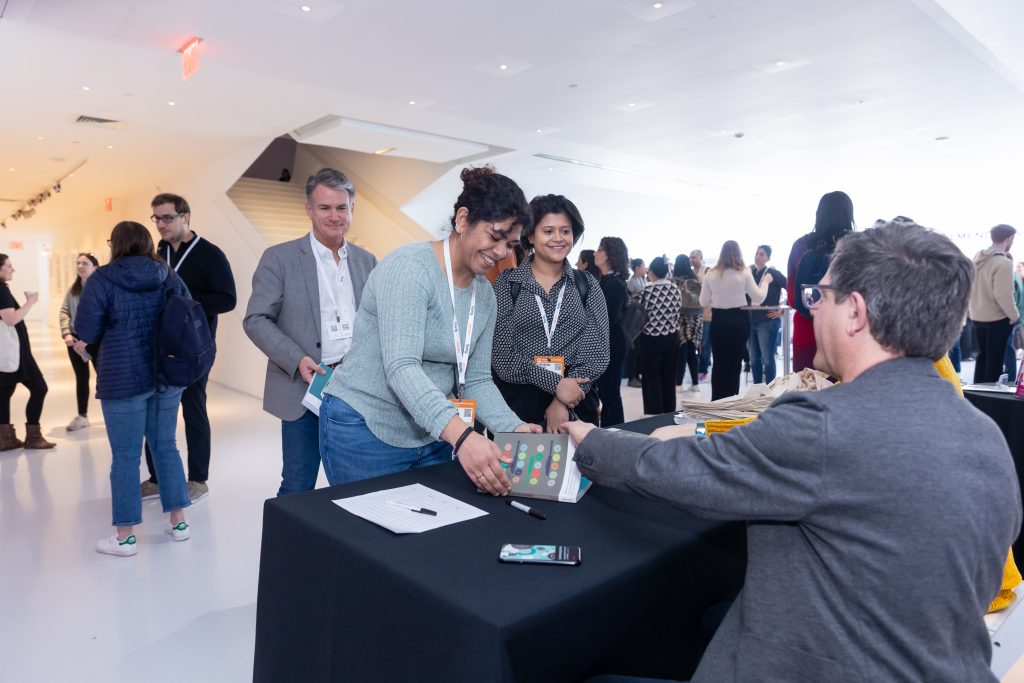
Meet some of your favorite authors on the conference floor during breaks in the program:
- Sheryl Cababa (Closing the Loop)
- Donna Lichaw (The User’s Journey, The Leader’s Journey)
- Stefanie Hutka (What Your Machines Should Do)
Sunrise yoga
7:00-8:00am: Start your day with a moment of calm: Conference curator Jem Ahmed will lead a session of gentle morning yoga and breathwork with a view of the Manhattan skyline. Whether you’re an experienced yogi or have never stepped onto a mat before, join us for a moment to connect with yourself before the second day of the conference begins.
Jem Ahmed is a classically trained yoga, breathwork and meditation teacher. She’ll draw on the ancient, interconnected practices of yoga and Ayurveda. Beginner and injury friendly. Mats and lovely views provided!
Dinner groups
6:00pm: Close out the week with a dinner group of 10 fellow attendees, exploring what NYC does best. Choose from Chinese, Korean, or a trip to Brooklyn’s legendary original Junior’s for cheesecake worth crossing a bridge for. We handle the reservation; you just need to sign up. Groups are small and spots go fast, so grab yours before they’re gone.
Not registered for the groundbreaking Shift UX conference yet? Register now before it’s too late!


